11 GPT 基本定时器实验
开发板官网(https://www.edevkit.com/)
本系列教程目录:
- 瑞萨单片机开发教程[一] e2-studio + DAP LINK开发环境搭建
- 瑞萨单片机开发教程[二] Keil/RASC开发环境搭建
- 瑞萨单片机开发教程[三] 新建RASC工程
- 瑞萨单片机开发教程[四] GPIO输出——led实验
- 瑞萨单片机开发教程[五] GPIO输入——按键key实验
- 瑞萨单片机开发教程[六] ICU外部中断实验
- 瑞萨单片机开发教程[七] SCI UART串口通信实验
- 瑞萨单片机开发教程[八] DMAC 串口数据传输实验
- 瑞萨单片机开发教程[九] ADC 电压采集实验
GPT 基本定时器实验
本章目标:
- 了解 RA6M5 处理器的 GPT 外设;
- 学会使用 RASC 配置 GPT 实现基本定时;
硬件设计
本实验使用开发板的 GPT 定时器外设,实现 1 秒定时中断,控制 LED 灯闪烁。
软件设计
新建工程
复制一份“07 SCI-UART_Recv_send”修改文件夹名“11 GPT_Basic_Timer”,双击打开 EBF_RA6M5.uvprojx 工程,通过 Keil 的新建文件新建 gpt_timer.c 和 gpt_timer.h,保存到目录下的 \src 文件夹下。
FSP 配置
Keil 界面选择“Tools”→“RA Smart Configurator”打开 RASC 界面。
打开 FSP 配置界面,在 Stacks 中加入 GPT。
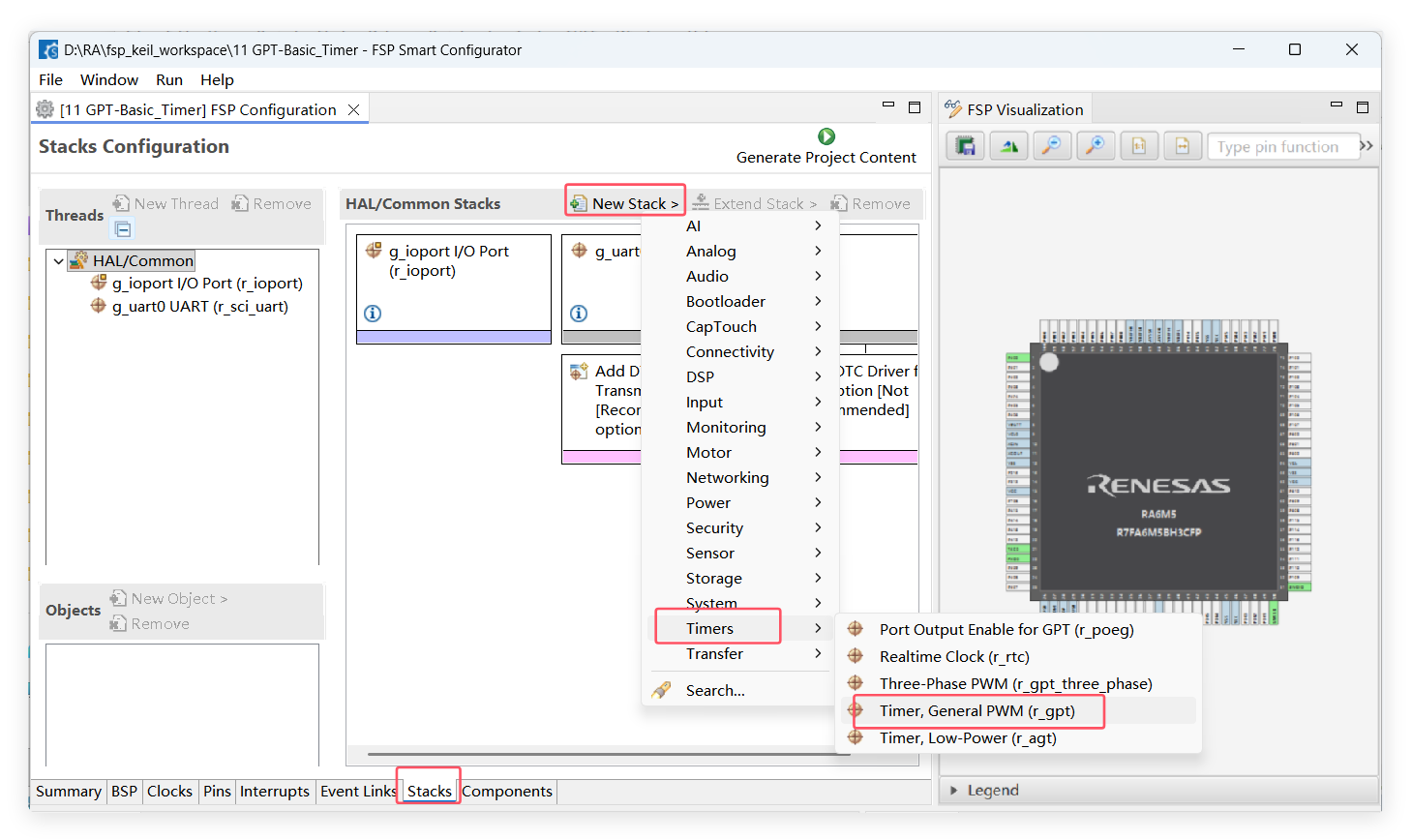
使用 GPT0 来实现定时和触发中断功能,需要修改的只有“General”和“Interrupts”部分,其他按照默认即可。
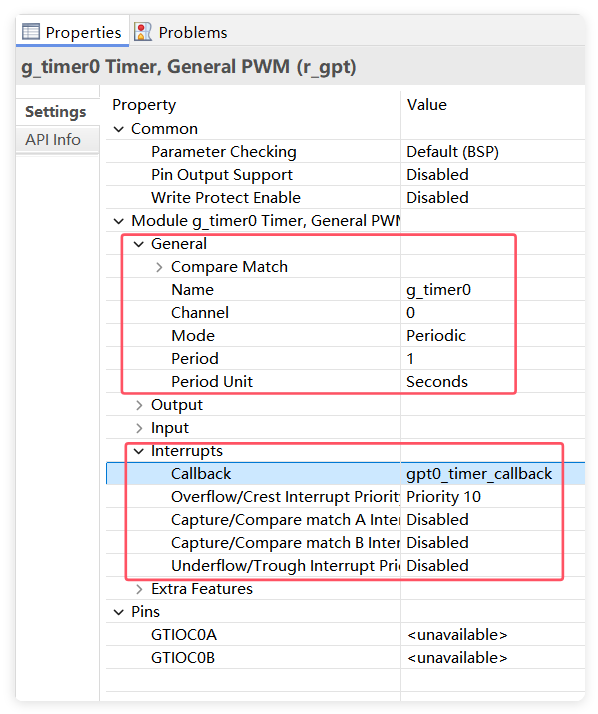
主要配置“General”和“Interrupts”这几个部分的属性,因此在这里会对它们进行详细讲解。而“Common”和“Extra Features”暂未用到,因此这里不需要对其进行配置。
“Common”部分的配置属性:
| 属性 | 描述 |
|---|---|
| Parameter Checking | 参数检查(选择是否生成包含参数检查的代码)。 |
| Pin Output Support | 支持引脚输出。 “Enabled”或“Disabled” 用于使能或禁止 GTIOCx 输出 PWM 信号。 “Enabled with Extra Features” 用于支持三角波输出模式, 以及用于支持“Extra Features”部分的特性。 |
| Write Protect Enabled | GPT 寄存器的写保护。选择使能/禁止写保护并应用于所有 GPT 通道。 若使能了这一项,则无法对 GPT 寄存器进行写操作,需要使用 r_gpt_write_protect_disable() 函数取消写保护,才能写入寄存器。 |
| Clock Source | 时钟源选择。 只能选择 PCLKD 作为内部时钟源。 |
“General”部分的配置属性:
| 属性 | 描述 |
|---|---|
| Name | 模块名字。 |
| Channel | 通道选择。指定硬件通道,也就是指定使用哪一个 GPT 定时器。 |
| Mode | 可以选择周期计数,单次计数,PWM 模式,三角波对称 PWM 模式和三角波不对称 PWM 模式。 Periodic One-Shot PWM One-Shot Pulse Triangle-Wave Symmetric PWM Triangle-Wave Asymmetric PWM Triangle-Wave Asymmetric PWM (Mode 3) |
| Period | 计数器的计数周期。 |
| Period Unit | 计数器计数周期的单位。 |
“Interrupts”部分的配置属性:
| 属性 | 描述 |
|---|---|
| Callback | 中断回调函数名。 |
| Overflow/Crest Interrupts Priority | 选择上溢中断的优先级。如果选择 Disabled 则禁止该中断。 该中断亦是三角波的波峰中断。 |
| Capture A Interrupts Priority | 选择捕获 A 中断的优先级。如果选择 Disabled 则禁止该中断。 |
| Capture B Interrupts Priority | 选择捕获 B 中断的优先级。如果选择 Disabled 则禁止该中断。 |
| Underflow/Trough Interrupts Priority | 选择下溢中断的优先级。如果选择 Disabled 则禁止该中断。 该中断亦是三角波的波谷中断。 |
配置完成之后可以按下快捷键“Ctrl + S”保存,最后点击 “Generate Project Content” 按钮,让软件自动生成配置代码即可。
- GPT配置信息
GPT 模块的配置信息在 hal_data.c 中以 timer_cfg_t 类型的结构体变量表示。
const timer_cfg_t g_timer0_cfg =
{
    .mode                = TIMER_MODE_PERIODIC,
    /* Actual period: 1 seconds. Actual duty: 50%. */
        .period_counts = (uint32_t) 0x5f5e100,
        .duty_cycle_counts = 0x2faf080,
        .source_div = (timer_source_div_t)0,
    .channel             = 0,
    .p_callback          = gpt0_timer_callback,
    /** If NULL then do not add & */
#if defined(NULL)
    .p_context           = NULL,
#else
    .p_context           = &NULL,
#endif
    .p_extend            = &g_timer0_extend,
    .cycle_end_ipl       = (10),
#if defined(VECTOR_NUMBER_GPT0_COUNTER_OVERFLOW)
    .cycle_end_irq       = VECTOR_NUMBER_GPT0_COUNTER_OVERFLOW,
#else
    .cycle_end_irq       = FSP_INVALID_VECTOR,
#endif
};
mode 表示 GPT 的类型,此处是周期型;
第05~06行:表示输出 PWM 的周期和占空比;
channel 表示使用的 GPT 的通道;
p_callback 表示 GPT 的中断回调函数;
使用 GPT 的 open 函数打开 GPT 设备的时候,就会使用这些配置信息初始化 GPT。
- 定时器中断函数
void gpt0_timer_callback(timer_callback_args_t *p_args)
根据中断回调函数的参数 timer_callback_args_t 的成员进行定制处理。
typedef struct st_timer_callback_args
{
    /** Placeholder for user data.  Set in @ref timer_api_t::open function in @ref timer_cfg_t. */
    void const  * p_context;
    timer_event_t event;               ///< The event can be used to identify what caused the callback.

    /** Most recent capture, only valid if event is TIMER_EVENT_CAPTURE_A or TIMER_EVENT_CAPTURE_B. */
        uint32_t capture;
} timer_callback_args_t;
常用的就是其中的定时器事件成员 timer_event_t。
/** Events that can trigger a callback function */
typedef enum e_timer_event
{
    TIMER_EVENT_CYCLE_END, ///< Requested timer delay has expired or timer has wrapped around
    TIMER_EVENT_CREST = TIMER_EVENT_CYCLE_END, ///< Timer crest event (counter is at a maximum, triangle-wave PWM only)
    TIMER_EVENT_CAPTURE_A,                    ///< A capture has occurred on signal A
    TIMER_EVENT_CAPTURE_B,                    ///< A capture has occurred on signal B
    TIMER_EVENT_TROUGH,      ///< Timer trough event (counter is 0, triangle-wave PWM only
} timer_event_t;
判断事件是否为 TIMER_EVENT_CYCLE_END,它表示计数到指定周期了才进入的中断。
if(p_args->event == TIMER_EVENT_CYCLE_END)
{

}
程序设计
实现 GPT 的基本定时器功能,开启 1s 的定时器中断,周期翻转 LED,实现 LED 的闪烁。
- 打开 GPT 设备
R_GPT_Open(timer_ctrl_t * const p_ctrl, timer_cfg_t const * const p_cfg);
p_ctrl:timer_ctrl_t 结构体指针参数,本质是一个 void 类型的参数,指向 st_gpt_instance_ctrl 类型变量;
p_cfg:timer_cfg_t 结构体指针参数,在程序中会指向在 hal_data.c 中定义的 g_timer_cfg 静态全局变量;
- 开启/停止 GPT 计数
R_GPT_Start(timer_ctrl_t * const p_ctrl);
R_GPT_Stop(timer_ctrl_t * const p_ctrl);
必须要在 GPT 打开状态下使用这两个函数。
- 定时器中断,判断周期END标志。
/* 定时器溢出 中断回调函数 */
void gpt0_timer_callback(timer_callback_args_t * p_args)
{
    if (TIMER_EVENT_CYCLE_END == p_args->event)
    {
        /* 翻转 LED1 */
        LED1_TOGGLE;    //每秒翻转一次
    }
}
程序编写
在 gpt_timer.h 头文件里定义初始化函数。
#ifndef __BSP_GPT_TIMING_H
#define __BSP_GPT_TIMING_H
#include "hal_data.h"

void gpt0_Timer_Init(void);

#endif
在 gpt_timer.c 里实现初始化函数、中断函数。
回调函数里面使用 if 语句判断触发中断的事件是否是定时器溢出事件,若是定时器溢出事件则翻转一次 LED1 引脚的电平。由于定时器配置为 1 秒的计时周期,因此每 1 秒会溢出一次,控制 LED1 的引脚的电平会每秒钟翻转一次。
#include "gpt_timer.h"
#include "led.h"


/* GPT初始化函数 */
void gpt0_Timer_Init(void)
{
    /* 初始化 GPT0 模块 */
    R_GPT_Open(&g_timer0_ctrl, &g_timer0_cfg);

    /* 启动 GPT0 定时器 */
    R_GPT_Start(&g_timer0_ctrl);
}


/* 定时器溢出 中断回调函数 */
void gpt0_timer_callback(timer_callback_args_t * p_args)
{
    if (TIMER_EVENT_CYCLE_END == p_args->event)
    {
        /* 翻转 LED1 */
        LED1_TOGGLE();    //每秒翻转一次
    }
}
在 hal_entry.c 文件中添加头文件 gpt_timer.h,在 hal_entry 入口函数初始化 gpt。
void hal_entry(void)
{
    /* TODO: add your own code here */

    led_Init(); // LED 初始化
    uart0_Init();
    gpt0_Timer_Init();

    printf("start gpt basic timer test\r\n");

    while(1)
    {

    }


#if BSP_TZ_SECURE_BUILD
    /* Enter non-secure code */
    R_BSP_NonSecureEnter();
#endif
}
下载验证
连接下载器,将程序编译并下载到开发板之后,按下复位按键来复位开发板,程序启动初始化完。
LED 灯 1s 周期闪烁。